SBU & Department 46 Hierarchy Changes:
Fashion → Style;
Home → Style;
ETS + Hardlines → ETS/Hardlines;
Department 46 (Beauty) → Style.
Important Dates:
Operational hierarchy updates: October 20; Shopper Behavior updates: December 7. Please login to
Scintilla.com for a more detailed banner
Share your experience in our short survey! Click here
We are aware of incorrect data for the street_dt field in Product Dimensions. Our data teams are prioritizing identifying a resolution. We anticipate that the corrected data will be available in the September 25, 2026 refresh. We apologize for the inconvenience.
We are aware of incorrect data for the street_dt field in Product Dimensions. Our data teams are prioritizing identifying a resolution. We anticipate that the corrected data will be available in the September 25, 2026 refresh. We apologize for the inconvenience.
As of today, September 23, Scintilla’s Store Inventory metrics have transitioned from a legacy data source to the new Enterprise Inventory (EI) data source, meaning that any data for September 23 and onwards will sourced from EI. This aligns Scintilla with the enterprise-standard inventory system, eliminates inconsistent logic within the legacy data source, and improves replenishment metric accuracy. Merchandising already completed this transition for Merch One on Tuesday, June 23. Historical data (June 1, 2025 – September 22, 2026) will go through a restatement process. Restatement work will begin on September 24, 2026 and will not be completed until October 8, 2026. Approximately 60 days' worth of data will be restated daily (with no restatement work performed on Fridays and Saturdays). In completing the historical restatement on October 8, we will be eliminating the temporary variance that existed between Scintilla and Merch One from June 23–September 22, 2026. During restatement period, clients should expect fluctuations to the relevant metrics that will be resolved once we finalize on October 8. They should also expect fluctuations due to changes to logic / formulas for the following fields: Instock % - TY/LY, Traited & Valid Store Count, Traited Item count and related velocity metrics. The following columns will be removed in the UI and null in BI Link from the date of release: Carry opt Cd, Carry Opt Status.
Due to an ongoing issue, the availability of data assets is currently delayed. Our team is actively working to resolve the issue and restore access as quickly as possible. We appreciate your patience and understanding.
On September 18, users may experience delays in receiving Store Inventory (catman) data, potentially resulting in an SLA miss. We are aware of the delay and our team is working to resolve it. We apologize for the inconvenience.
Hierarchy changes are now reflected across the Data Access and Collaboration portfolio. If you have any pre-built reports utilizing hierarchy filters, you may need to clear these filters and recreate them with the new hierarchies.
Please submit requests via a support ticket to get historical UPC Sales to reflect hierarchy changes in Shopper Behavior. You can submit a ticket for these August changes beginning on Monday, August 24.
Hierarchy changes are now reflected across the Data Access and Collaboration portfolio. If you have any pre-built reports utilizing hierarchy filters, you may need to clear these filters and recreate them with the new hierarchies.
Please submit requests via a support ticket to get historical UPC Sales to reflect hierarchy changes in Shopper Behavior. You can submit a ticket for these August changes beginning on Monday, August 24.
Hierarchy changes are now reflected across the Data Access and Collaboration portfolio.
Please submit requests via a support ticket to get the updated item hierarchy. You can submit a ticket for these August changes on or after Tuesday, August 11.
We will restate corrected Markup Markdown Board data this weekend. The restated records will flow through incremental updates to both Data Feeds and Cloud Feeds, which may update values previously received. Please ensure downstream processes are prepared to consume these incrementals. We will update this notice when the restatement is complete.
We are aware of a data issue with RFID Tag Part table. We are working to fix the issue.
Service Advisory: Cloud Feeds, Data feeds Pipeline Delay We are currently experiencing an infrastructure issue impacting Cloud Feeds and Data feeds data pipelines due to a constraint within our platform. As a result, there may be delays in data availability and refreshes. We are actively engaging and working toward resolution. We will provide updates as additional information becomes available.
We have become aware that there is missing store sales data for May 26, 2026. This missing data is impacting Scintilla suppliers and the category advisor persona who rely on headless access (Cloud Feeds, Data Feeds API and Scintilla Media Data Feed). Our team investigated the issue and resolved it as of 11:30 am CT this morning. Report Builder is unaffected and has all sales data for May 26, 2026. Please see the next steps below on how to restore missing sales data. Data Feeds API: The historical file for the affected May 26 store sales data will be made available, and suppliers will need to manually consume it to recover the missing records.
We have become aware that there is missing store sales data for May 26, 2026. This missing data is impacting Scintilla suppliers and the category advisor persona who rely on headless access (Cloud Feeds, Data Feeds API and Scintilla Media Data Feed). Our team investigated the issue and resolved it as of 11:30 am CT this morning. Report Builder is unaffected and has all sales data for May 26, 2026. Please see the next steps below on how to restore missing sales data. Cloud Feeds: The data will be restated and published as an on-demand update in the status table. Suppliers can manually use the status timestamp to read the restated store sales data using CDF. If they do not take manual action today, then it will process automatically tomorrow via the normal CDF process.
On this page, we will walk through how to set up an ODBC connection for your Windows-Based operating system so you can connect your data using Microsoft Excel.
Before You Begin
Before you can enable a connection to Microsoft Excel, you will need to obtain and download a Walmart-issued, secured key. If you have not yet obtained a secure key, please contact your Account Manager to request access.
Set Up the ODBC Connection
Watch the video or follow the steps below to set up the ODBC connection. Suggested installs needed are provided below.
① Install the ODBC driver
Navigate to ODBC drivers for BigQuery to download and install the ODBC driver that is appropriate for your operating system.
Locate and open the ODBC Data Source Administrator on your computer.
Select Add.
Find and select the ODBC Driver for Google BigQuery that you just installed. Select Finish.
② Complete all required fields
Once the new Simba ODBC Driver for Google BigQuery DSN Setup window opens, complete all of the required fields:
Data Source Name:Provide a name you would like to give to the connection, such as "BI Link Channel Performance".
Description:Provide a description for the connection, such as "WMT BI Link".
Service Authentication:Provide the email associated with the connection, then browse to and select your Walmart-issued secured key.
Catalog (Project): Select the Channel Performance offering in the dropdown (wmt-dv-bi-link-prod). Note that the project will only become available after the secured key is selected under the Service Authentication.
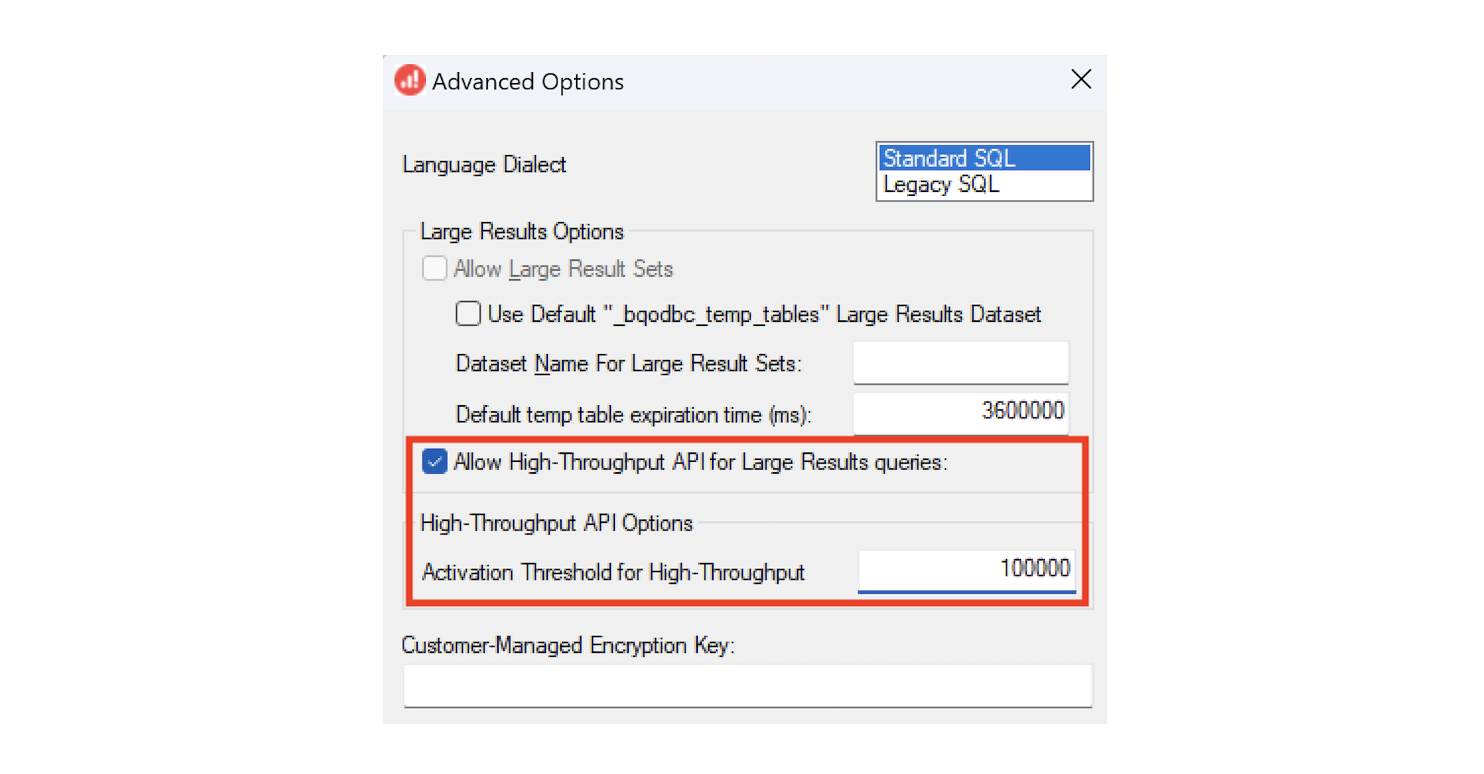
Allow High-Throughput:Select "Advanced Options" in the lower, right corner of the window. Then:
Select the box next to Allow High-Throughtput API for Large Results queries
Set the Activation Threshold for High-Throughput as 100000 (see image below)
Your use of this documentation is at your own discretion and risk. To the maximum extent permitted by law, the data, documentation and all related software, components, and support are provided by Walmart on an ‘as-is’ and ‘as available’ basis without any warranties of any kind, and Walmart expressly disclaims any and all express and implied warranties, including, but not limited to, warranties of merchantability, fitness for a particular purpose, title, non-infringement, non-interference, and warranties arising from a course of dealing. You acknowledge that Walmart does not warrant that the data will be uninterrupted, timely, secure, or error-free. Walmart may modify and delete the documentation in its sole discretion and without notice.
In no event shall Walmart be liable to you or any third parties for any damages whatsoever, including, without limitation, those resulting from loss of use, damage to your computer system, loss of data or profits, or any liability arising out of or in connection with the use of the data, documentation, software, components, or support.